
▶️ Tap Resource menu to see all your resources.
Then tap Learning, Organisation or Favourites then swipe up and down to find a specific resource or use search to find a resource by name.
From the Resources dashboard you can review all available resources.
- Learning Resources - those that have been unlocked as part of an enrolment in a Question Series.
- Organisation Resources - those that have been shared with you as a individual learner, as a member of a group or as user in the whole organisation.
- Favourite Resources - those that you have marked as a favourite for easy access.
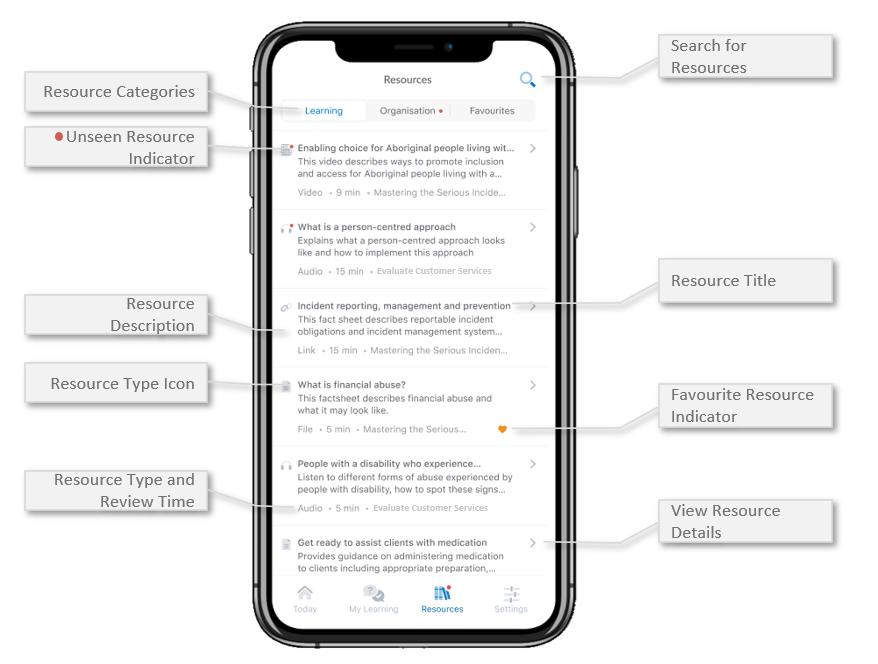
✅ Tap a Resource to view the resource details, organisational resources will always be available to view even if you aren't enrolled in any Series
⚠️ Not able to find a specific resource? Learning Resources only stay in your dashboard while the series is active. They will be removed once the Series expires.
Was this article helpful?
Still need help?
Contact us